
Approvals that run themselves, inside Google Workspace.
Whether you are a fifty-person firm or a multi-site enterprise, the pattern is familiar: approvals live in email threads, chat messages, and spreadsheets nobody fully trusts. Requests stall, deadlines slip, and capable people spend their day chasing signatures.
WorkFlura turns everyday requests — expenses, purchases, leave, vendor onboarding, contract sign-offs — into structured, trackable workflows that run inside the Google tools your people already use, with enterprise-grade security and a data model in which your data never leaves your own environment.
Watch the product overview (5:58)
From a Google Form submission to a recorded decision: the designer, the Chat notification, and the reports, in six minutes.
How it works
1Design the workflow
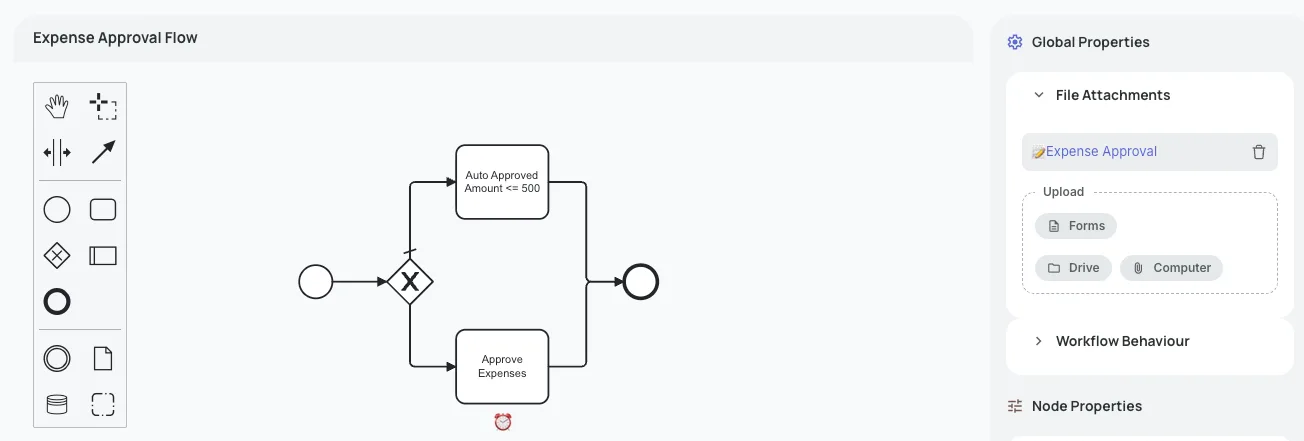
Map the approval flow in the visual Workflow Designer: who approves, in what order, under what conditions, and what happens when a step runs late. Route by organizational unit, by role, or by a named person; branch on the answers in the form; add parallel paths, revision loops, and SLA timers. Reference named policy values (an approval floor, a travel cap) that you can change on a date without touching the workflow.
2Create the form
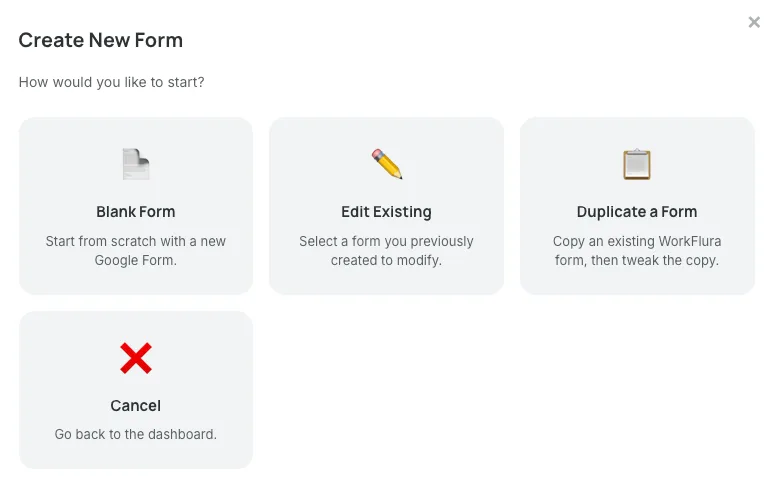
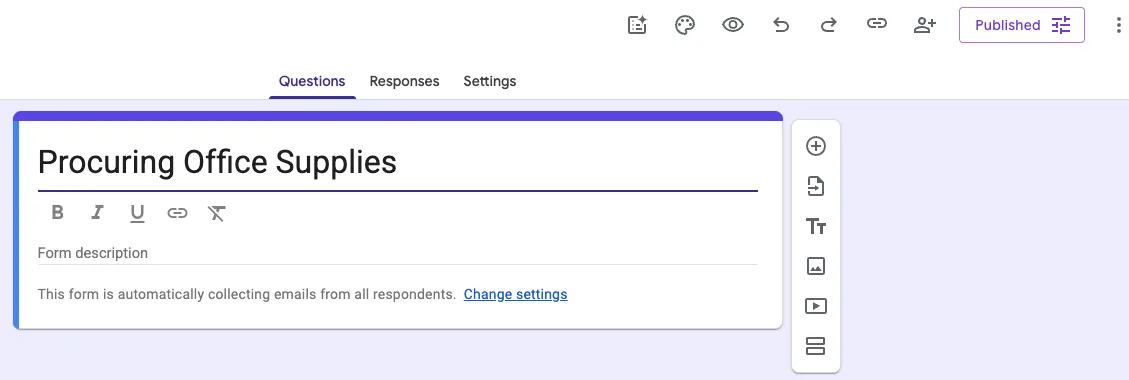
Create the Google Form straight from WorkFlura. It is placed in your organization's WorkFlura Forms shared drive, linked to the workflow, and its questions become the fields your routing rules can use. Start from one of the built-in templates or design your own.
3Submit and route
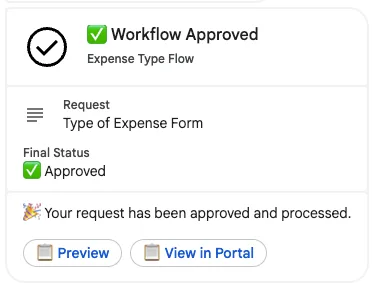
When someone submits the form, WorkFlura takes over — in seconds, not hours. The request is routed to the right approver, who is notified in Google Chat the moment it lands, with a preview of the request and a link to decide in the WorkFlura portal: approve, reject, or send it back for revision. Many platforms batch or poll; WorkFlura moves each request the instant it arrives, on desktop or on the Chat mobile app. Submitters can attach supporting files from Google Drive or their computer, and every action is recorded against the request.
4Track and report
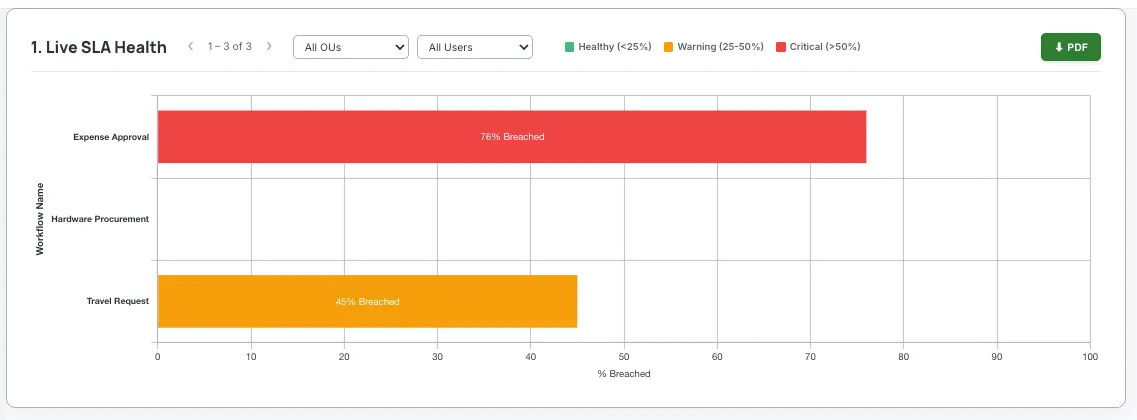
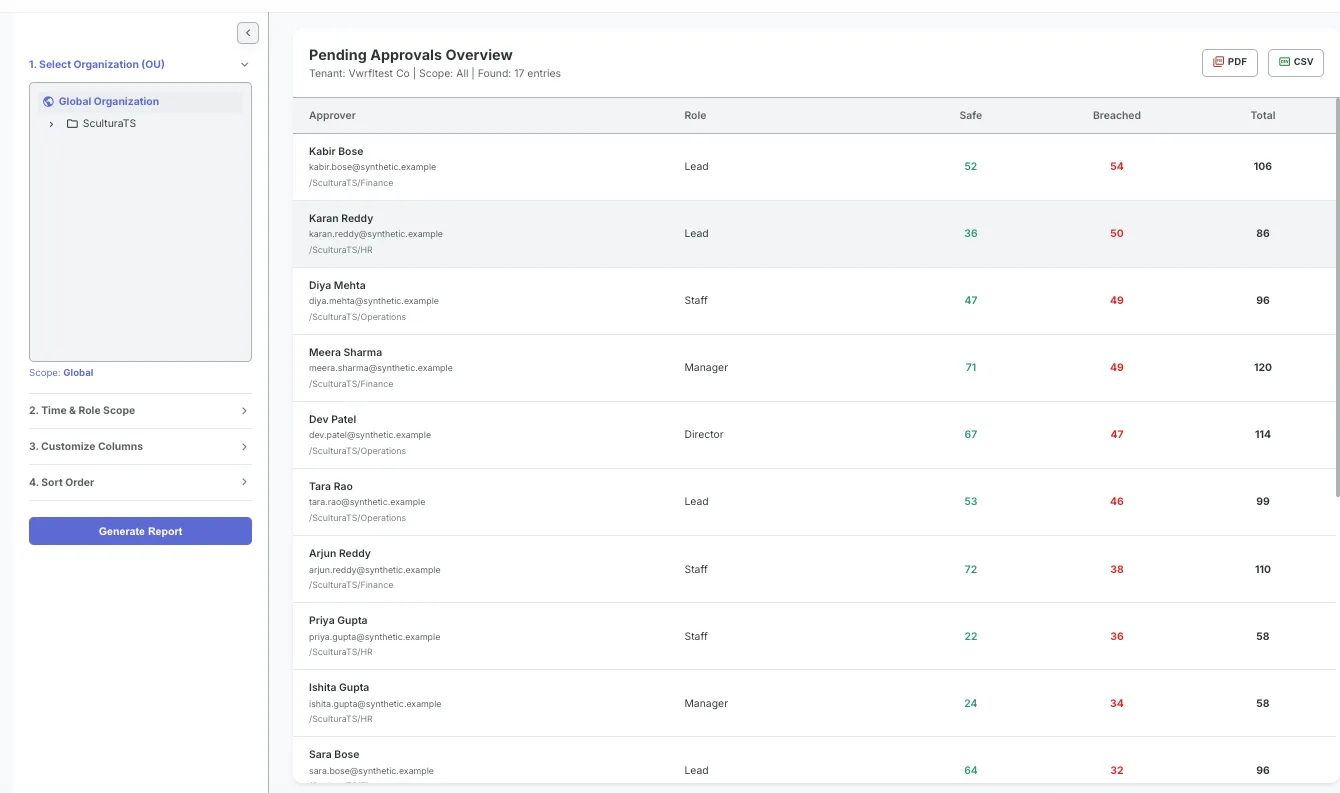
See what is pending, on time, or breaching SLA across the organization. Dashboards show volumes, approval rates, turnaround, and bottlenecks by workflow, department, or period, so operational data becomes something you can act on.
Key features
Built for Google Workspace
Sign in with Google, forms in Google Forms, notifications in Google Chat, files in Google Drive. Nothing to install on users' machines.
Visual Workflow Designer
Drag-and-drop, BPMN-style design with conditional routing, parallel approvals, revision loops, and validation rules. No coding required.
Google Chat notifications
Approvers are told the instant a request lands, with a preview and a link into the portal; submitters and managers are kept informed as the request moves.
SLA tracking
Time limits per step, live SLA status on every request, and reporting on breaches, so delays surface before they become problems.
Policy values
Effective-dated figures such as spending limits and approval thresholds that rules reference by name. Update the value on the date it changes and every workflow follows.
Roles and organizational units
Model your structure once — departments, teams, locations — and let routing follow it. Control who can design, who can approve, and who can see reports.
Template library
Ready-made workflows for expense reimbursement, leave, purchase orders, invoice approval, travel, contracts, IT change management, onboarding, performance reviews, budgets, document review, compliance audits, and more. Every template is editable.
Attributed approvals, tamper-evident audit trail
Every decision is made by a Google-authenticated identity, timestamped, and written to a log users cannot edit. The non-repudiation control procurement and audit teams ask for is built in.
Attachments
Invoices, receipts, contracts, photographs — attached from Drive or uploaded, and kept with the request as part of its record.
Enterprise-grade security
Google Sign-In only, encryption in transit and at rest, deny-by-default access rules, role-based permissions, and support access your administrator grants for a limited time and that is logged in your own project.
Archival and retention
Completed requests can be archived on a schedule you set, with retention aligned to your fiscal and legal requirements.
Your data, your environment
All workflow data lives in a Google Cloud project your organization creates and owns. WorkFlura operates on it and never holds a copy, so you keep full control and the freedom to query, export, or retain it on your own terms.
Who it is for
WorkFlura fits any organization that runs approval-based processes, from a single department to a multi-entity enterprise. The published plans cover organizations of up to 1,000 users; the platform has been tested at 100,000 users, and deployments beyond the published plans are set up as Enterprise Custom.
Manufacturing
Material requisitions, quality checks, maintenance requests, defect reports
Trading and distribution
Purchase orders, sales order approvals, logistics exceptions
Retail
Replenishment requests, return authorizations, store operations checklists
Professional services
Client onboarding, timesheet approvals, change requests
Construction
Site inspection reports, subcontractor approvals, safety documentation
Healthcare and education
Procurement, staff leave, vendor credentialing, administrative approvals
What you need
A Google Workspace organization
Every user signs in with their existing Google account. There is nothing to install on laptops or phones.
A Google Cloud / Firebase project
Your organization creates it during setup; WorkFlura stores your workflow data there, so it remains yours. Google's usage charges for that project are billed to you directly and are typically small.
About 45 minutes, with us on the call
The guided setup wizard takes a Workspace super administrator through each step — service account, delegation, shared drive, Chat app, and Forms controller — with copy-paste commands and readiness checks at every stage.
Ready to set up? Write to info@sculturats.com and we'll walk through it together on a 45-minute Google Meet.
How WorkFlura uses your Google account
When you sign in with Google, WorkFlura asks for two permissions, used only for the actions you take in the app.
Google Forms forms.body
To create and configure the forms you build from the Workflow Designer, and to read their questions so answers can be mapped to workflow fields. WorkFlura does not touch forms it did not create.
Google Drive, app-created files only drive.file
To place those forms in your organization's WorkFlura Forms shared drive, duplicate or delete them when you do, and let you attach a file you choose from Drive to a request. WorkFlura cannot see the rest of your Drive.
Reading form responses, keeping form notifications alive, and reading your directory are done with service accounts your administrator authorizes in the Google Admin console, as described in the Privacy Policy. WorkFlura's use of information received from Google APIs adheres to the Google API Services User Data Policy, including the Limited Use requirements.
Get started
Thirty days, all features, no credit card. Ready to set up? Write to us and we'll walk through it together on a 45-minute Google Meet.
info@sculturats.com